Midterm Grade Calculator
Are your midterm exams around the corner, and you’re stressing about the results? Or do you want to know if your efforts are enough to achieve your desired rank? This midterm grade calculator is here to help you take control and estimate your grades before it’s too late.
Know exactly what score you need — on your midterm, on your final, and everywhere in between.
Keep pushing — every point counts. Come back after each exam to track your progress!
Run the main calculator first, then come here for scenarios.
Preparing for your best academic performance includes not only study habits but also staying aware of where you currently stand, as knowing it can help you to achieve your desired outcome. This midterm grade calculator is here to help you know your scores even before your finals. By just entering your assignments, tests, or quizzes’ scores, you can determine your interim accurately without any hassle.
Want to calculate grades beyond midterms? Try our Grade Calculator or Semester Grade Calculator to instantly calculate your scores, whether weighted or unweighted.
What is the Midterm Grade Calculator?
This midterm grade calculator is an online, free academic tool that helps students, parents, and teachers to calculate current points and also what they need to get in the interim and what they need on the final exam to achieve their desired goal. Combining all your coursework gives you a clear view of your performance during your entire course.
How to Use This Midterm Grade Calculator
Keeping an eye on your academic performance became easier with this calculator. You don’t get lost in formulas or math complexities. By following just a few simple steps, you can calculate it in no time.
Step 1: Enter Assignment Name
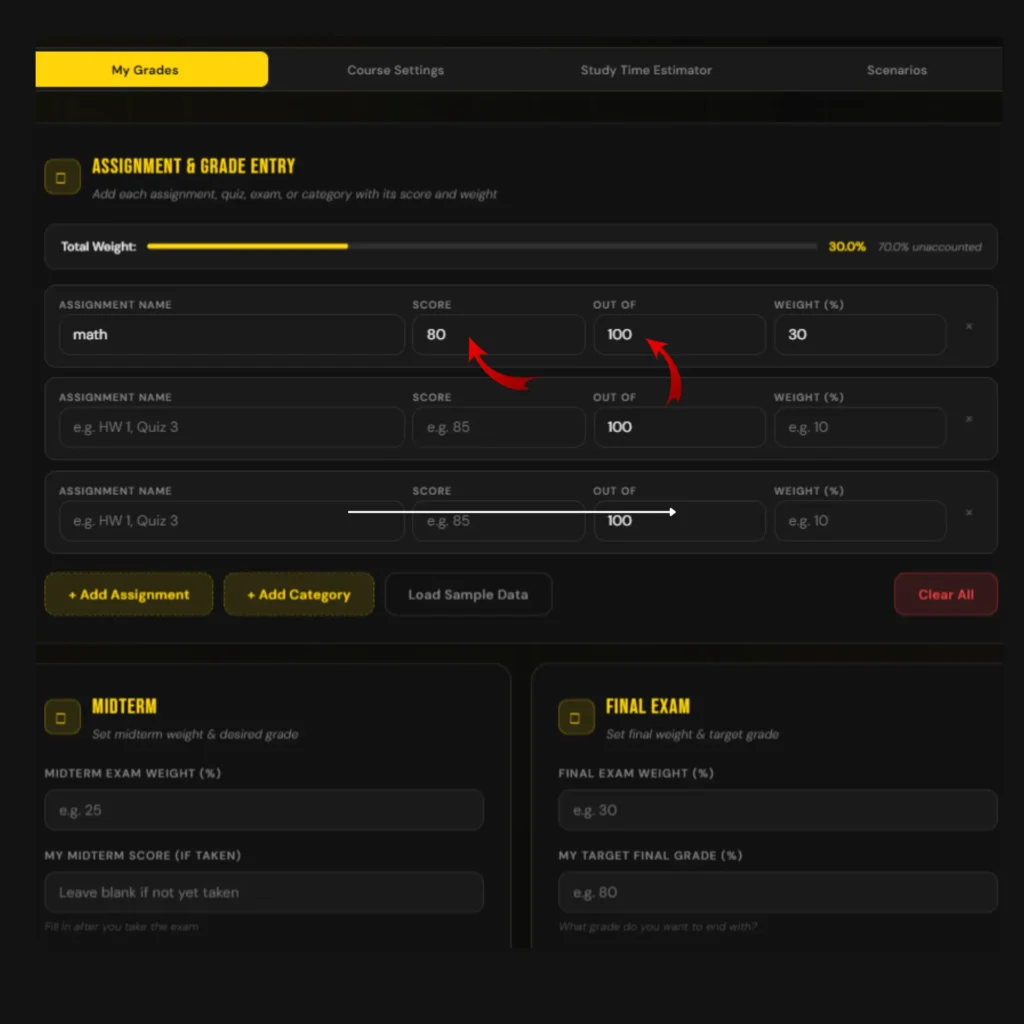
First, you need to enter assignment names. It could be assignments, tests, or quizzes. With the help of the add assignments button, you can add as many assignments as you want to calculate.

Step 2: Your Earned Scores
Then you need to enter your total marks, out of which you earned them, and then you need to enter the marks earned.
Step 3: Assignments Weight
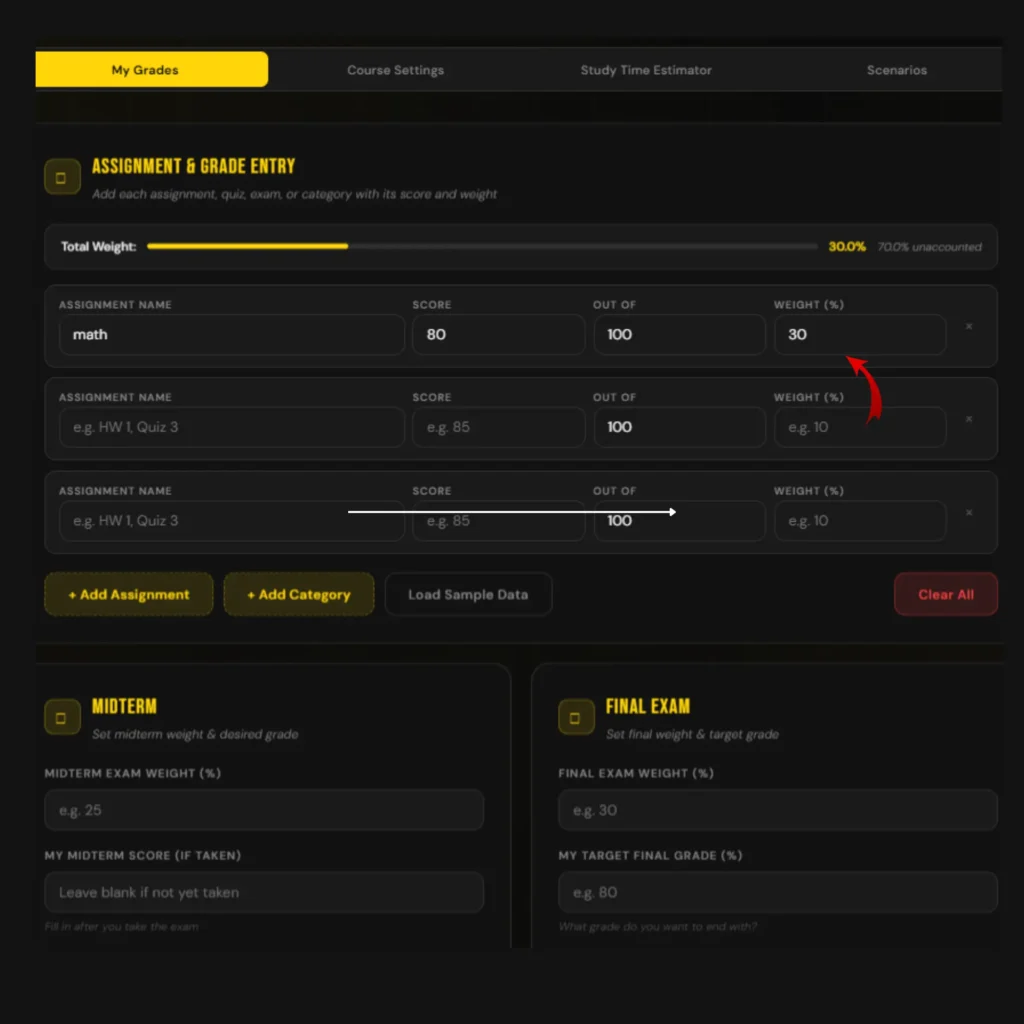
After that, you need to enter the weight that this specific assignment holds.
Step 4: Midterm Weight
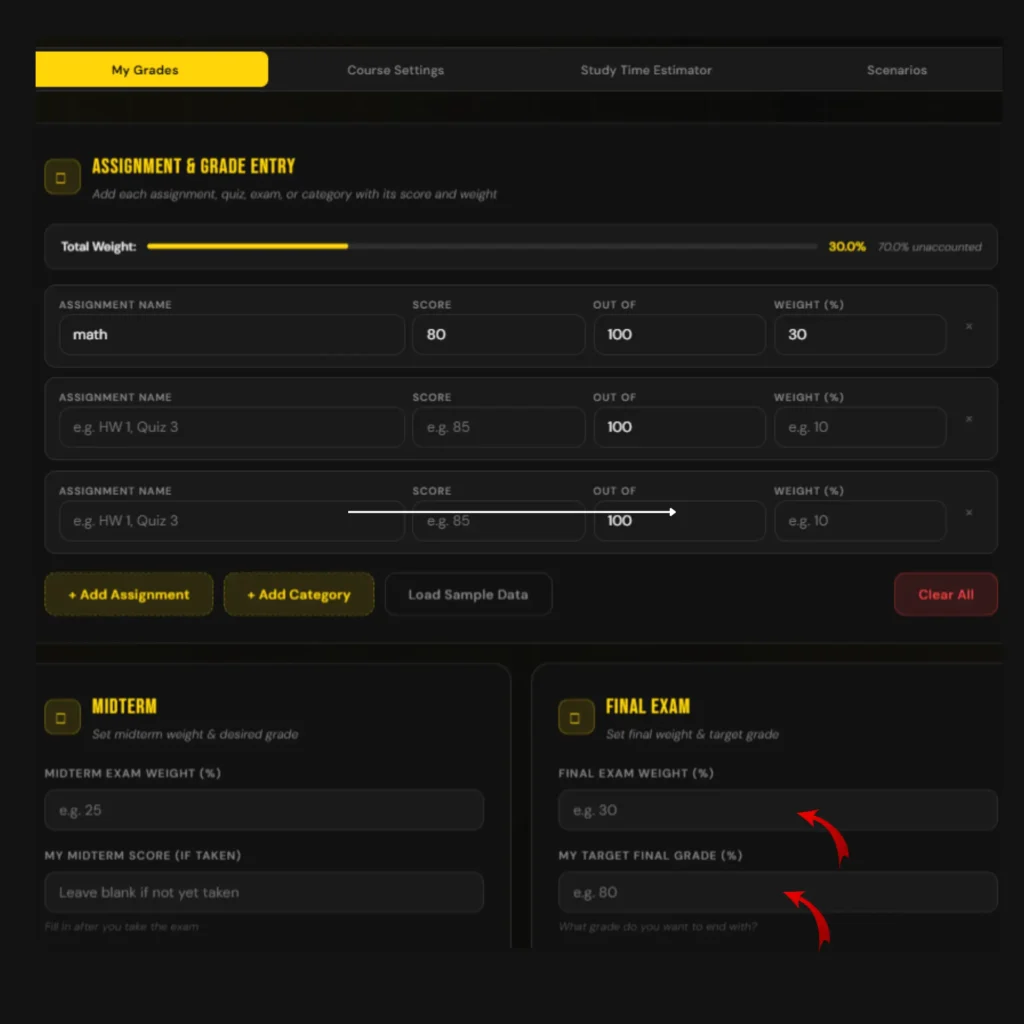
Enter the weight that is assigned to your halfway exams. This will indicate how much your score will affect your overall total.

Step 5: Final Exam Weight
After putting in your half-term exam weight, also add your final exam weight and your desired targeted marks to see how much chance you will have left to get your desired level.
Step 6: Pressing the “Calculate” Button
In the final step, you now just need to click the calculate button, and you will see your result instantly. You can download the PDF or share your result on WhatsApp to share this moment with your loved ones.

Step 7: Analysis Grading Tools
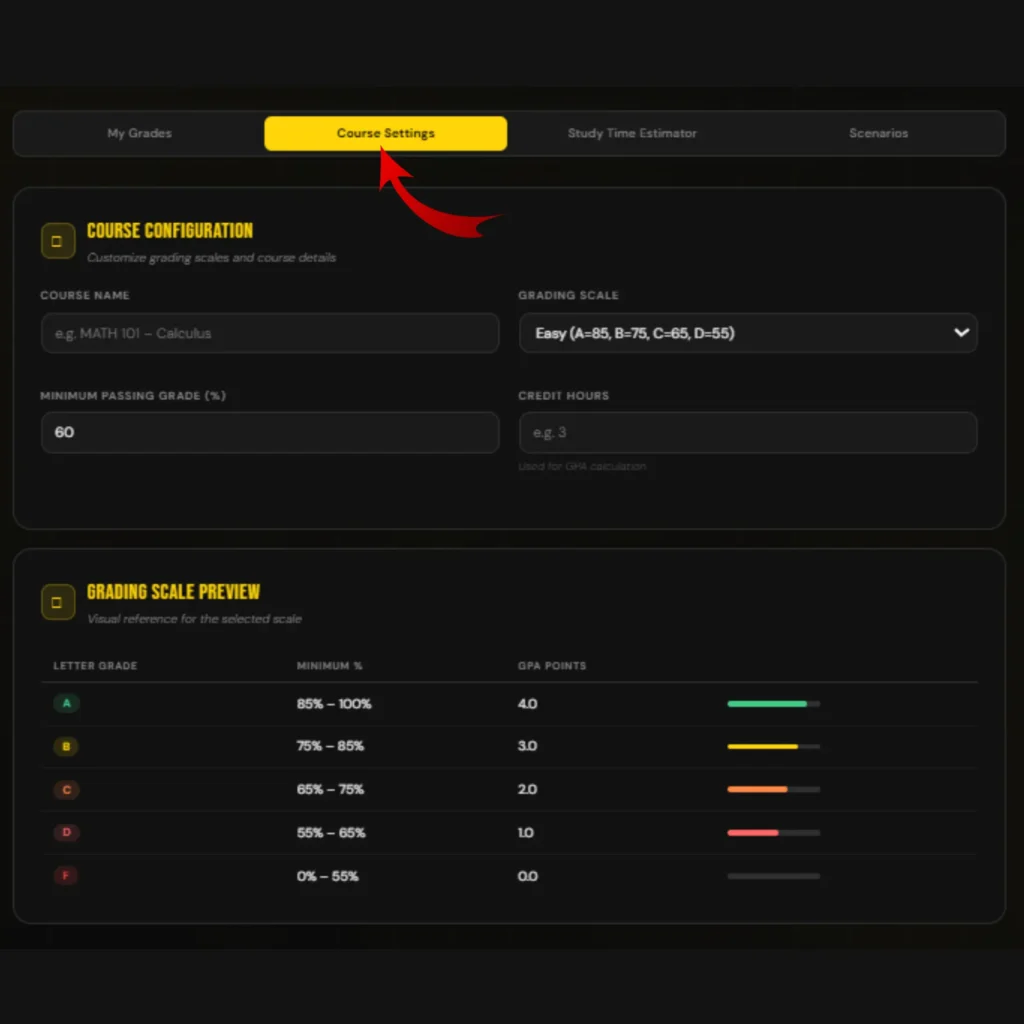
Along with the midterm grade calculator, take full advantage of using the course configuration feature that will allow you to set the grading scale according to your academic institute’s policy. Also, use a study time estimator to know how much time you need to give to your studies in the days that are left before your exams. And finally, use the scenarios feature that will handle all the stress of what-ifs for you.


How to Calculate Midterm Grades?
While innovation can save a lot of your time, many of you may still want to know how you can estimate the middle phase manually. There are two popular systems in which students’ performance is measured. The University of Washington explains how weighted averages are used to calculate grades, which shows how widely this grading system is used. Weighted or unweighted calculation in both grading systems is explained below.
Step 1: Make a list of all your earned
Take a paper and start writing your earned scores in all assignments, homework, quizzes, tests, etc. Write every complete assignment’s mark, not incomplete ones.
Step 2: Confirm Grading System
There follow two systems most academic institutes follow in the US. Weighted or unweighted. To accurately calculate percentages, you should know which grading system your institute follows because different formulas are used for both.
Step 3: Convert Points to Percentage
If your grades are in points, convert them by simply dividing your earned points by the total points and then multiplying the value you receive after division by 100. That’s how you can convert them into a percentage.
Step 4: Percentage to Decimal
If your academic institute follows weights, then it is necessary to convert percentages into decimals to get the correct result. For conversion of percentages to decimals, just divide each percentage by 100.
Step 5: Apply formula to get result
For an unweighted calculation, add all your ratings and divide them by the number of assignments. And for weighted ones, first multiply each category by its weight, and then make a total that you will get after multiplying each. And that’s how you will determine half-term marks yourself.
Step 6: Final Midterm
If you want to know your final midterm assessment, then combine all the results that you get, and that’s it.
Midterm Grade Calculation Formula
To calculate mid-semester, most often the formula is used that combines all levels and their components with their contribution to the total rank. Have a look below to understand it better.
M G = Σ (S × W)
Here, M represents mid-semester, G represents grade, S shows scores, and W is used for weights.
Example of Midterm Grade Calculation
Calculation becomes much easier when you can see a real example. A simple example of estimating a periodic exam using a weighted grading system, which is mostly followed by educational institutions, is below.
Example 1: Calculating Midterm in a Weighted System
I’m using one of my students’ examples here to show you how he outperformed in his educational journey. He once came to me and shared that his marks were continuously dropping, and as his teacher and mentor, I advised him to use a midterm grade calculator to keep a close eye on his scoring, and it worked for him. Have a look at his following ranks.
| Assignment | Score | Weight | Decimal | Calculation | Contribution |
|---|---|---|---|---|---|
| Homework | (90÷100) × 100 = 90% | 45% | 45÷100 = 0.45 | 90×0.45 | 40.5 |
| Tests | (85÷100) × 100 = 85% | 30% | 30÷100 = 0.30 | 85×0.30 | 25.5 |
| Quizzes | (75÷100) × 100 = 75% | 25% | 25÷100 = 0.25 | 75×0.25 | 18.75 |
| Midterm Grade | 100% | 40.5+25.5+18.75 | 84.75% |
Example 2: Calculating Midterm in a Weighted System
The calculation for unweighted grades works differently because all assignments are treated equally. That is why the calculation becomes simpler, as you can see below.
| Assignment | Score | Percentage |
|---|---|---|
| Homework | (75÷100) × 100 | 75% |
| Tests | (80÷100) × 100 | 80% |
| Quizzes | (85÷100) × 100 | 85% |
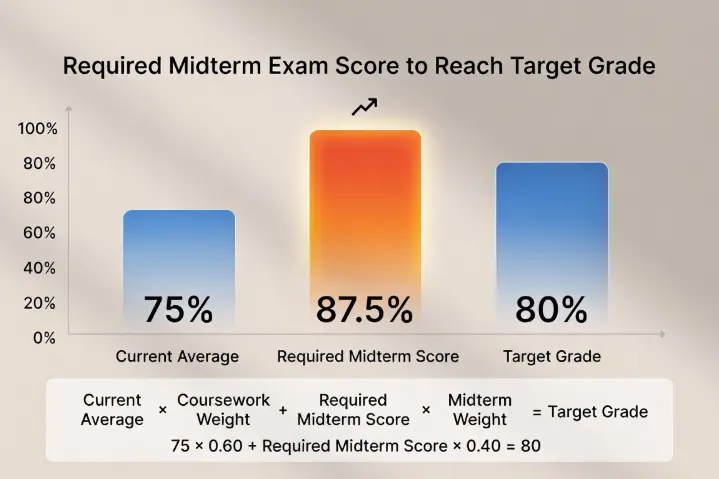
Now add all the percentages, like 75 + 80 + 85, and divide by the number of assignments, which in this case is 3. You will get 80%, and that is your result. For better understanding, consider the chart below:
Frequently Asked Questions
Does this midterm grade calculator show accurate results?
Yes, behind the scenes, this midterm grade calculator does real and accurate math using standard formulas used by most schools, colleges, and universities.
Why do I need to convert my grades to decimals if they are already in percentages?
It is important to convert to decimals if you want to calculate grades accurately, because decimals make weighted grade formulas work more cleanly and precisely.
What is the difference between midterm and semester grades?
While midterm grades show your progress halfway through the course, the semester grade reflects your overall performance for the entire term.